Store
Storefront research from San Francisco's public records: vacancy, tenants, permits, owners and brokers, with a deeper web pass run on your server.
- Home key: t
- Needs: Needs the internet
- Coverage: San Francisco only
- Offline: History of past lookups
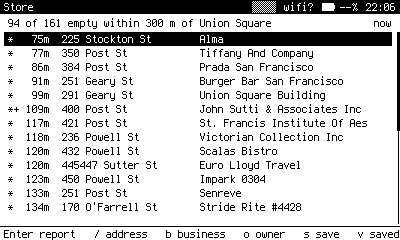
Near, at a Union Square fix: storefronts around you, empty ones marked with a star. Live public data.
What it does
Store answers one question about a storefront: who do I call? It reads San Francisco's open data through a small property lookup Worker and puts the owner and broker at the top of every report, above occupancy, permits and building facts.
San Francisco only
The underlying datasets cover the city and county of San Francisco. Anywhere else, Near says the fix may be outside the city.
Near
Storefronts around your fix, empty ones first. Stars mark vacancy.
| Key | Does |
|---|---|
| Enter | Open the report for that address. |
| r | Cycle the radius. |
| w | Refetch the list. |
| / or a | Look up an address, with suggestions as you type. |
| b o | Look up a business, or an owner. |
| v | Saved reports. Enter opens one to add a note. |
The report
A ranked list of rows, each with its source and confidence: owner, broker, manager, listing, contact, status, vacancy tax, permits, tenant history, news, building, links. The header says whether the report has been dug, and how many rows name someone to call, or that nobody was named, which is the honest answer for many addresses.
| Key | Does |
|---|---|
| d | Dig: your server runs Claude Code over the open web to find whether the space is listed and by whom, who owns or manages the building, and whether the last tenant closed. About two and a half minutes; kept for a week. |
| i | Which datasets answered and how far each lags: the business registry about six weeks, the vacancy tax roll a year or more. |
| Enter | A row in full. On a row that names a person, company, domain or phone, Enter again pivots: to a business's other locations, an owner's other parcels, or Search with o. |
| s | Save the report as a property record with frontmatter. Saving again appends a dated section. |
Three kinds of lookup
Tab cycles them in the lookup box.
- Address: the report.
- Business: every place a business name has been registered, with dates, open ones first.
- Owner: every parcel an entity has filed commercial vacancy tax on, with a vacant or occupied history by year. The roll names only owners who filed, and the header says so.
History
Every lookup is kept under the empty box. A stored report is shown at any age and refreshed when it is old; if the Worker cannot be reached, the footer shows the stored age and the error. x twice clears history, reports and digs.
Saved reports are written under notes, so they sync to your vault's inbox as records ready to ingest.