Clock
A clock face with the date, battery, tonight's moon and the weather. It appears after three quiet minutes and is also what the lock screen wears.
- Home key: c
- Needs: Works with nothing
- Offline: Full, weather from cache
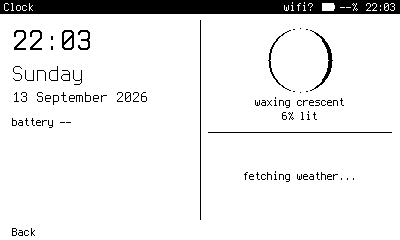
The full face: time, day, date, battery, the moon, and the weather.
What it does
Clock is not on the Home grid, but c opens it, and it comes up on its own after three minutes without a key. Any key returns to where you were, and that key is swallowed rather than typed into the app. The lock screen wears the same face: the first key drops it and the PIN is underneath.
The face redraws once a minute. A memory LCD holds its image with almost no power, so it is always on rather than blank.
What it shows
The left half has the time, day, date, battery and a line of Claude usage. The right half has the moon, drawn with its shadow, above the weather with an icon, temperature and the reading's age. If the cached forecast is missing, more than thirty minutes old, or for another place, the face fetches one, unless the radio is off.
Settings
Settings > Clock and lock face has five switches: 24 or 12 hour; the full face or the time alone, large and centred; and whether the moon, weather, battery and usage line are shown. Set idle_minutes = 0 in the config to never show the face on its own.