
Software for three small screens.
Apps for a Mac menu bar, a pair of G2 glasses and a Beepy handheld. The screens below are their real size.

Geary Blvd & Van Ness Ave · 3 min walk 3:45 PM59° Cloudy · updated 1m All · 6 routes ▼ 2m 14m | 38 OB Point Lobos Geary & Van Ness due 9m | 38R IB Salesforce Transit Geary & Van Ness 11m 26m | 49 OB City Collegetap: refresh · hold: pin · double-tap: exit

Six apps for the G2.
The display is 576 by 288, sixteen shades of green, sitting in the corner of your view. Pick an app to see its screen.
- Muni Tracker, the full page
- Breadcrumb, the full page
- Fieldbook, the full page
- Readiness, the full page
- Storefront, the full page
- G2 RSS Reader, the full page
Geary Blvd & Van Ness Ave · 3 min walk 3:45 PM59° Cloudy · updated 1m All · 6 routes ▼ 2m 14m | 38 OB Point Lobos Geary & Van Ness due 9m | 38R IB Salesforce Transit Geary & Van Ness 11m 26m | 49 OB City Collegetap: refresh · hold: pin · double-tap: exit
A pocket computer that runs off your own server.
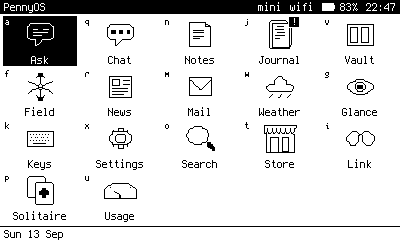
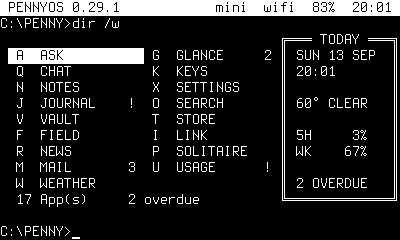
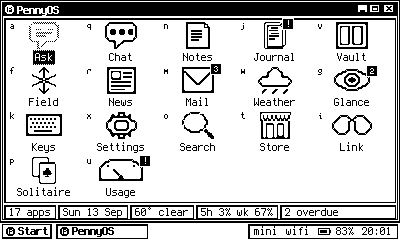
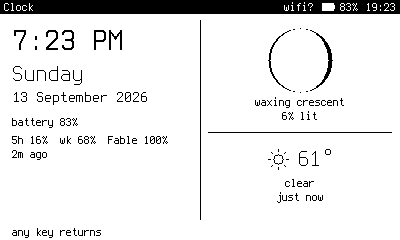
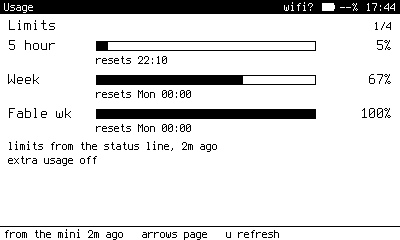
The Beepy is a palm sized Linux handheld with a BlackBerry keyboard. PennyOS gives it eighteen apps on one black and white screen, one letter each.
The work happens on your server. The device holds no API keys, encrypts its card, and asks for a PIN at every boot.
Four Home themes: grid, os8, win95 and terminal.
0.36.0, released 14 Sep 2026. PennyOS, the full page
- aAsk
- qChat
- nNotes
- jJournal
- vVault
- fField
- rNews
- mMail
- wWeather
- gGlance
- kKeys
- xSettings
- oSearch
- tStore
- iLink
- pSolitaire
- uUsage
- cClock


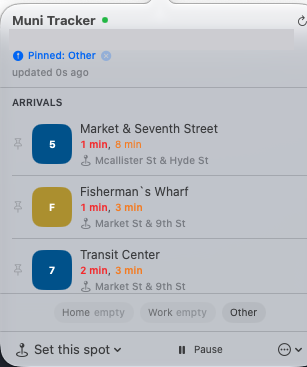
One app, in the menu bar.
Muni Tracker
Muni Tracker sits in the macOS menu bar and shows when the next Muni vehicles reach the stops around you. It works out how long the walk takes and tells you when to leave. When live data is missing it falls back to the schedule, and it says which one you are looking at.
2.0.3, 17 Jul. macOS 14 or later on an Apple Silicon Mac.
I decide what each app is for and what it must never do. Claude Code agents write most of the code, and other agents check it.
I pick the problem, set the rules, and look at every screen before it ships. The agents write the code, the tests and these pages. A separate agent reads each privacy page against the app's source and flags anything the code does not do.
A claim nobody could confirm stays off the page.
Read How Kingsley works, the page on the vault behind these apps
- 79
- claims held back from these pages, unverified as of 14 Sep 2026
- 8
- apps across three devices, counting PennyOS as one
- 0
- API keys on the Beepy. Ask runs Claude Code on its owner's server.
Every app here is built to a written spec, a rules file, and a gate script that has to pass before anything ships. Below is that process as a general prompt. Paste it into Claude Code and start your own.
You are helping me build and ship a small app. Work in small, verified steps, and do not write code until we have agreed on a spec. Step 1. Ask me these questions first, one message, then wait for my answers: 1. What does the app do, in one sentence, and who is it for? 2. What platform does it run on, and what are its hard limits (screen size, inputs, storage, network)? 3. What data does it touch: what it reads, what it stores, where it sends anything? 4. Where will it be released, and what does that store or host check before accepting it? 5. What is the smallest version worth shipping? Step 2. Write SPEC.md, one page. It covers the purpose, the smallest shippable version, the layout stated in exact numbers (sizes, limits, counts), the data the app handles, and what is out of scope. If a screen cannot be written as boxes and numbers, it is not designed yet. Show me the spec and wait for my approval. Step 3. Write CLAUDE.md for this project. Include: the platform constraints, what is deliberate and must not be changed by accident, the rule that credentials never go inside a shipped package, and the rule that a check which could not run must never be reported as a pass. Step 4. Build in small steps. After each step, run the app or its tests and tell me what you actually exercised and what you did not. Commit each working step with a message saying what changed. Step 5. Write a gate script, check.sh or similar, that runs before any release: build succeeds, tests pass, no secrets or keys in the package, version numbers match, the privacy page exists. A failing gate blocks the release. Treat a failure as the finding, not something to route around. Confirm that any tool the gate uses really parsed its input, because an empty result from a tool that read nothing looks exactly like a clean one. Step 6. Write PRIVACY.md from the code, not from the spec. List every piece of data read, stored or sent, with the file and function that does it. Then do a separate pass that checks each sentence against the code and removes or corrects anything the code does not support. Step 7. Keep UNCONFIRMED.md. Any claim nobody has verified (device behaviour, performance, compatibility) goes there instead of into the docs or store listing. Report its count before each release. Step 8. Keep CHANGELOG.md. One dated entry per version: what was asked, what broke, the root cause, what was fixed, and what was not tested before release. Untested behaviour is not a reason to hold a release. It is a reason to say so in the entry. Step 9. When the gate passes, package the build and cut a tagged release with the built file attached, in the same session. Committed but unreleased is unfinished.