Muni Tracker
SF Muni arrivals for the stops near you, in the menu bar.

What it does
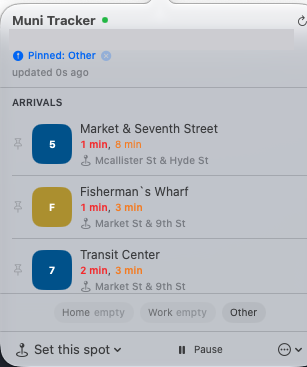
Muni Tracker sits in the macOS menu bar and shows when the next Muni vehicles reach the stops around you. It works out how long the walk takes and tells you when to leave. When live data is missing it falls back to the schedule, and it says which one you are looking at.
- Finds the Muni stops within a short walk of your Mac's location and lists the next arrivals for each route.
- Puts a leave-now cue in the menu bar that allows for the walk to the stop plus two minutes for crosswalks. It can change colour, play a sound, or post a notification.
- Uses live GTFS-RT data first, then the schedule, then a copy of the Muni schedule bundled in the app when there is no network. The panel says live, scheduled, or offline.
- Saves Home, Work, and Other spots and can switch to one when you arrive there. You can also widen the search to a 10 or 15 minute walk, or pin it to a saved spot for 30 minutes.
- Pins favourite routes to the top and gives each route its own colour.
- Adds a Small and a Medium desktop widget that shows the same arrivals. Tapping it opens the app, refreshes, or pins a route.
Requirements
macOS 14 or later on an Apple Silicon Mac. Location access to find nearby stops. An internet connection for live arrivals. Useful only in San Francisco.
Changelog
- 2.0.3
Checks for a newer version at launch, once a day, and from Check for Updates in the menu, and shows a banner when one exists. Nothing downloads or installs on its own. Routes missing from the live feed at a stop now fill in from the schedule. The widget's version number was corrected, and cached stop data now refreshes when the bundled schedule changes.
- 2.0.2
Refresh now waits for your current location instead of using the previous one. The saved spot highlight clears when you leave every saved spot. Without a GPS fix the app now starts from central San Francisco rather than a fixed address. Location permission is requested when the panel opens, with an Enable button while it is undecided.
- 2.0.1
Removed a six stop limit that hid routes, such as the 38 and 38R, at busy corners. Saved spot switching now works after the Mac has slept. The leave-now buffer went from one minute to two.
- 2.0
Added the desktop widget in Small and Medium sizes, with the arrival times first, pinned routes on top, and dimmed times when data is stale. Taps open the app, refresh, or pin a route.