Settings
Every setting PennyOS has, in seven groups. Values the system reports are read fresh each time, and a setting the driver refused says so.
- Home key: x
- Needs: Works with nothing
- Stored: local.conf in the data directory
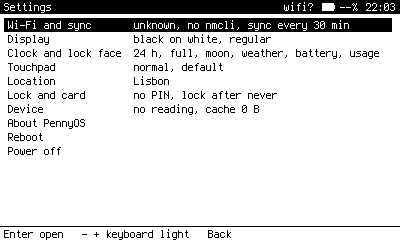
The top level. Each group's line summarises what is inside.
The groups
| Group | Holds |
|---|---|
| Wi-Fi and sync | Network, the radio switch, the device's address, Sync now, and Auto sync every 15, 30 or 60 minutes or never. |
| Display | Display mode, font, Home theme, icon size, keyboard light, and how long before the light turns off. |
| Clock and lock face | 12 or 24 hour, full or time only, and whether the moon, weather, battery and usage show. |
| Touchpad | Speed, and mode: default, always on, or enter only. |
| Location | The saved places, and Locate. |
| Lock and card | PIN, Lock after, and the encrypted card's state. |
| Device | Battery drain, firmware, and Clear cache. |
About, Reboot and Power off sit below the groups, one press each. Reboot, Power off and Clear cache ask to confirm.
How rows behave
- A value with fixed choices, like Display or Lock after, opens a small window listing them with the current one marked. Enter picks, Back cancels.
- An action, like Wi-Fi, Font, PIN or Location, opens its own screen.
- A fact, like Battery or Firmware, just reads.
On the top level, - and + adjust the keyboard light.
Worth knowing
- Display auto is white on black by day and black on white after dark, computed from sunrise and sunset at your fix.
- Font: regular is Spleen, bold and large are Terminus, which has a designed bold at every size. Lists reflow; Field's drawn instruments do not.
- Touchpad mode: default turns the pad off on Back; always on keeps it on; enter only makes a click Enter and ignores swipes. If the driver refuses a change, the row says
NOT APPLIEDand names what the driver reports. - Lock after: immediately when the clock face appears, after 30 seconds, 1, 3 or 5 minutes without a key, or never. Boot, the terminal and Journal always ask.
- Clear cache removes fetched data only. Notes, journal, the vault mirror and saved records stay.
Choices are written to local.conf in the data directory, which overrides /etc/pennyos.conf. See Configuration.