Ask
A conversation with Claude that runs inside your Obsidian vault on your server and streams onto the device's screen.
- Home key: a
- Needs: Needs your server
- Runs on: Your server, as Claude Code
- Offline: Past conversation only
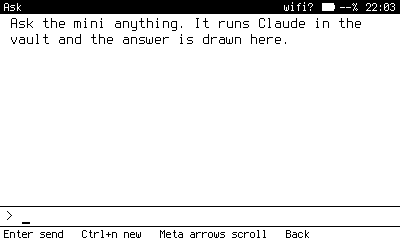
Ask, waiting for a question. The answer streams in above the composer line.
What it does
Ask is Claude as a page rather than a terminal. Type a question on the bottom line, press Enter, and the answer is drawn above it as it arrives, wrapped to the width of the screen. Because Claude runs inside your vault, it can read your wiki and answer from what you have already written.
Keys
| Key | Does |
|---|---|
| Enter | Send the question. |
| Ctrl+c | Stop an answer in progress. |
| Ctrl+n | Start a new conversation. The old one is kept. |
| Meta arrows | Scroll back through earlier turns. End returns to the bottom. |
How it works
- The device opens SSH to your server with its own key. The gate on the server accepts only the
askshape. - The gate runs
claude -pin your vault directory with streamed JSON output. The permission mode is forced todefault, so Claude can read but will not quietly make changes. - The first turn starts a session; later turns resume it, so Claude remembers the conversation.
- Each chunk is drawn as it lands. The transcript is saved on the device, so a past conversation still reads offline.
No Anthropic key is on the device. Claude Code on the server uses the account it is signed in with.
If you have paired glasses with Link, each answer is also mirrored to them as it streams. After every answer, Ask refreshes the usage line in its footer, because an answer just used some of your limit. See Usage.
When it cannot answer
If the server does not answer, the send fails and says so. Nothing is lost; ask again when the status bar shows the server.
Needs on the server
- Claude Code installed and signed in, with
claudeon the PATH of non-interactive SSH sessions. On macOS with zsh, that means setting PATH in~/.zshenv, not~/.zshrc. - The gate. See The gate.