About PennyOS
A drawn, keyboard first shell for the Beepy handheld. Eighteen apps on a 400 by 240 one-bit screen, an encrypted card, and no API keys on the device: your server does the thinking.
A pocket computer that leaves the API keys at home
PennyOS turns the Beepy, a palm-sized Linux handheld with a BlackBerry keyboard, into a pocket computer: eighteen apps on one 400 × 240 black and white screen. Your own server does the thinking, and the device holds no API keys.
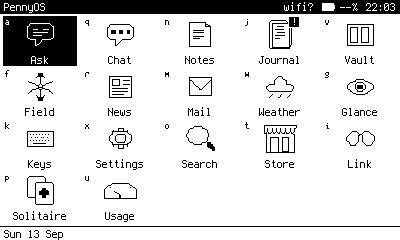
The screen is a real PennyOS frame, rendered by its simulator with demo data.
Free and independent. The source is shared by request while PennyOS is pre-1.0.
Read the guide · Request the source:
Meet the Beepy
A palm-sized Linux computer made by SQFMI: a crisp black and white screen, a BlackBerry keyboard with a trackpad, and a Raspberry Pi inside. It is a little bigger than a deck of cards.
- Screen. A 2.7 inch Sharp memory LCD, 400 × 240 pixels, pure black and white. It reflects light like paper, reads well in sunlight, and holds its image on almost no power.
- LED. One colour light. PennyOS uses it for sync, new mail, overdue items and low battery.
- Trackpad. An optical pad that works as arrow keys. Click it for Enter.
- Call, Berry, Back, End Call. Call is Control, Back goes back everywhere, and holding End Call returns Home.
- Keyboard. A backlit BlackBerry Q20 keyboard, the reason most people want one.
- Side button. Tap to lock. Double tap for a torch.
- Power switch. On the left edge, and the right way to turn it off.
- USB-C. On the bottom edge, for charging.
Inside: a Raspberry Pi Zero 2 W running Linux, an RP2040 chip that runs the keyboard and power, and a 2000 mAh battery. 74 × 104 × 15 mm. See photos of the real device from its maker.
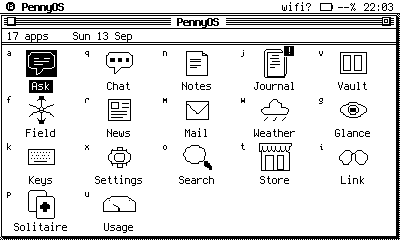
Eighteen apps. One letter each.
Grouped by what each one needs, because on a device you carry, that is the question that matters. Every app has its own page in the guide. See the apps.
The server does the thinking
PennyOS is the pocket end of an Obsidian vault kept on an always-on computer you own. The Beepy reaches that computer over SSH, and a gate on it decides exactly what the device may ask for.
- Ask runs Claude Code inside your vault and draws the answer as it streams.
- Vault reads a mirror of your wiki, even with the radio off.
- Notes and Journal sync one way into the vault's inbox.
- No service credential lands on the device. Mail tokens, search keys and your Anthropic login stay on the server. The device holds its own SSH key and random pairing ids.
Two paths out. Everything personal goes through the gate. Public, keyless data goes straight to the internet.
- The internet. Open-Meteo, OpenStreetMap, BeaconDB, Wikipedia, and the hubs for Link, News and Store. Keyless, straight from the Beepy.
- Beepy. PennyOS, holding no service keys.
- The gate, over SSH.
pull push ask localask glance usage mail search storefront - Your server. Obsidian vault, Claude Code, a local model, a console, and every credential.
Four ways to wear Home
- grid: every app on one screen, the jump letter tucked in each cell's corner, a status line along the bottom.
- os8: a Mac OS 8 homage. Home is a platinum window, and Space drops a menu from the penny in the menu bar.
- win95: a Windows 95 homage. Home is a maximized window over a taskbar, and Space opens Start.
- terminal: a dir /w listing in an 8 by 16 grid, always light on dark, whatever the display mode says.
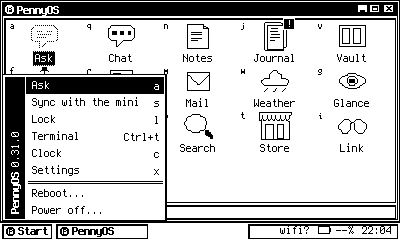
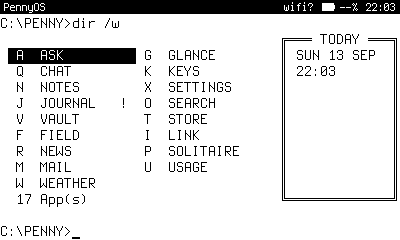
Choose one under Settings > Display > Home theme. A theme dresses the band every app draws under, the boot splash and Home itself. Apps keep their own layout, so nothing moves when you switch.
Offline is the normal case
You land somewhere, roaming is off, and there is no plan yet. That is when a pocket computer earns its place, so PennyOS caches on purpose.
| With | What works |
|---|---|
| Nothing at all | Notes, Journal, Vault on its mirror, Keys, Clock, Solitaire, and every cached page: the last forecast, Field's city dossier, Mail and News as of the last sync, Search and Store history. |
| A phone hotspot | Weather, Field, News, Store near you, Link to the glasses, and Locate by the Wi-Fi around you. |
| Your server, from anywhere | Ask, Chat, Mail, Glance, Search, Usage, the Store dig and sync. Tailscale on the device reaches the server away from home. |
Lose it, and lose nothing
A pocket computer gets left on trains. PennyOS is built for that day.
- An encrypted card. Notes, caches and the device's SSH key live in a LUKS2 volume using Adiantum, which runs three to four times faster than AES on the Pi Zero 2 W.
- A PIN at every boot. Wrong guesses wait longer each time. Journal and the terminal always ask.
- A gate, not a shell. The device's SSH key runs a short list of fixed commands on your server, and every call is logged.
- One line to revoke. Delete the device's line from your server's authorized_keys and it can reach nothing.
What you need
A Beepy, a card, and an evening. The server is optional: without one, the offline and internet apps still work.
Requirements (v0.31)
DEVICE   Beepy (SQFMI) with a Raspberry Pi Zero 2 W
CARD     microSD, 16 GB or more
OS       Raspberry Pi OS Lite, Bookworm
DRIVERS  sharp-drm and beepy-kbd (install.sh builds them)
PYTHON   3.11 or newer, standard library only

OPTIONAL
SERVER   an always-on Mac or Linux box with SSH,
         holding an Obsidian vault
NETWORK  Tailscale, to reach it away from home
GLASSES  Even Realities G2 with the Penny app, for Link
Access is granted by hand. Send your GitHub username and a line about your setup through the Contact me button. · Install guide
Data, services and software PennyOS relies on
- Weather, air and geocoding by Open-Meteo.com, CC BY 4.0
- Map data © OpenStreetMap contributors, ODbL, via Overpass API, Nominatim and Photon by Komoot
- Place summaries from Wikipedia, CC BY-SA 4.0
- Wi-Fi location by BeaconDB
- Vault reads markdown vaults in the Obsidian format
- Ask, Store dig and Search web pass run Claude Code by Anthropic on your server
- Chat runs a local model with Ollama
- Hubs and this site on Cloudflare Workers
- Store reads DataSF open data
- Search reads crt.sh, RDAP, the Internet Archive, Shodan InternetDB, ipwho.is, Gravatar, GitHub and MailAccess
- Mail reads Gmail over IMAP with Google OAuth
- Panel fonts Spleen by Frederic Cambus (BSD 2-Clause) and Terminus by Dimitar Zhekov (OFL 1.1)
- Hardware Beepy by SQFMI; Beepy drivers by ardangelo; Raspberry Pi OS
PennyOS is an independent project, published by oddrefresh. It is not affiliated with, endorsed by, or sponsored by SQFMI, Beeper, BlackBerry, Raspberry Pi Ltd, Obsidian, Anthropic, Google, Cloudflare, Even Realities, Apple, Microsoft, or the owners of Inspector Gadget. All trademarks belong to their owners. Software is provided as is, without warranty. See disclaimers.
Panel images on this site are real frames from the PennyOS simulator, rendered with demo data.